• Skip to primary navigation
  • Skip to main content

ToolFleet

Online software to manage service intervals for your machinery

  • Home
  • Pricing
  • Resources
  • Contact
  • Login
  • Sign Up

3. Finding what you’re looking for, in the asset lists

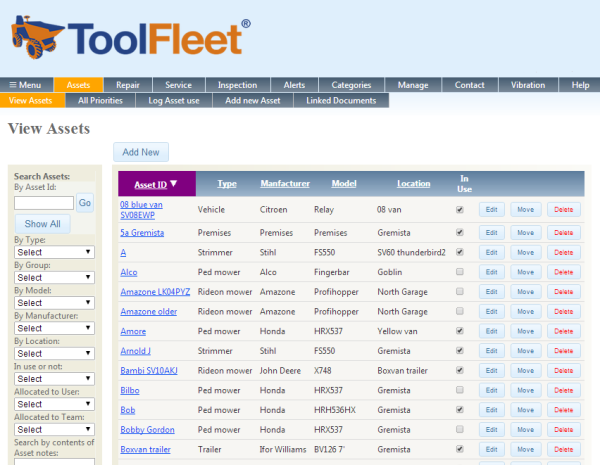
Screengrab of ToolFleet Asset listSearching and filtering

When you navigate around ToolFleet for the first time, you might wonder how you can find a particular asset, or group of assets, within a list that can potentially contain many hundreds or even thousands of assets? The lists are easy to sort / search / filter:

  • Searching is easy – simply type what you’re looking for into the “search” box, and hit “go”.
  • Or, you can sort by a column category, simply by clicking on its header. For example, on the “view assets” screen, you could sort the list into order of “model”, by clicking on the word “model” in the column header. All the assets will then appear in alphabetical order (A-Z) of what model they are.  You can also reverse-alphabetise the list (Z-A), by clicking the same header a second time.
  • Filtering a list is a piece of cake.  🙂  Within the filter-box on the left hand side of the page, simply click on the category you want to filter by, then select the item you want to find within that list. You can do this repeatedly for different categories, until you’ve refined your list. For example, to find all the vehicles at your main base, you’d select “Vehicle” in the ‘type’ box, then “HQ” (or something like that) in the ‘location’ box. You could narrow this down further, by filtering ‘manufacturer’ or ‘model’. To narrow it further, you could filter by ‘team’ or ‘user’. To clear your filters and see all the assets again, click the “Show All” button (near the top of the search / filter section).

Seeing all the information you’ve got on a particular asset

To see an asset’s details, simply click on the name of the asset wherever you see it appearing as a blue “link”.  This takes you to the ‘asset details’ page.  There you can view almost everything to do with an asset – its full history, all its current alerts, recent service history, ‘linked’ documents, etc.  You can also raise various actions for this asset from this page (eg, log an alert, a service, etc).

You can also download an asset’s complete history (or alternatively all your assets’ histories!) via the ‘download asset history’ facility.  This is found under ‘Manage’ / ‘Transfer data’ / Download. Click here if you want to read more detail on this feature.
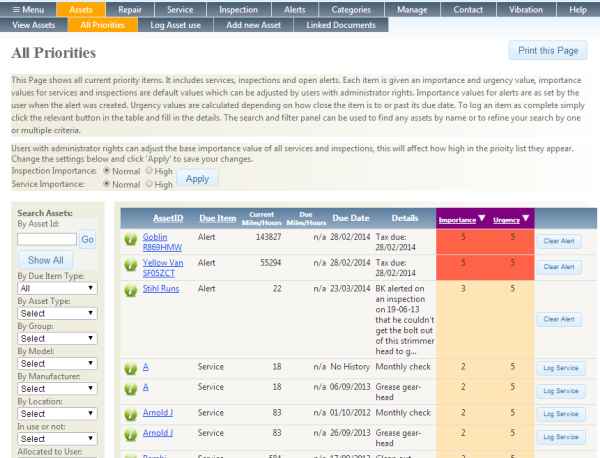
 

Screengrab of All Priorities list in ToolFleet‘All priorities’ list

The ‘all priorities’ list is another useful and important page.  This is where you can see a consolidated “priority” list of the current most urgent and important alerts, services and inspections, for all assets. Basically, everything that needs actioned, assembled into order of priority.

To find this page, look under “Assets” / “All priorities”.

By default, inspections have an importance rating of ‘1’, and servicing an importance rating of ‘2’.  This means the alerts, which are generally more pressing, should mostly rise higher up in the listing.  However, you can increase the importance of servicing and inspections, should you wish.

Next>>>

1. What is ToolFleet?
2. Logging in.
3. Finding what you’re looking for, in the asset lists.
4. Logging information.
5. Raising ‘alerts’.
6. Moving an asset, and putting an asset in-use / out-of-use.
7. What’s ‘Group’ for?
8. What to do if you need help, or hit a technical difficulty.
9. A final word.

Copyright © 2026 · Genesis Sample on Genesis Framework · WordPress · Log in

We use cookies on our website to give you the most relevant experience by remembering your preferences and repeat visits. By clicking “Accept All”, you consent to the use of ALL the cookies. However, you may visit "Cookie Settings" to provide a controlled consent.
Cookie SettingsAccept All
Manage consent

Privacy Overview

This website uses cookies to improve your experience while you navigate through the website. Out of these, the cookies that are categorized as necessary are stored on your browser as they are essential for the working of basic functionalities of the website. We also use third-party cookies that help us analyze and understand how you use this website. These cookies will be stored in your browser only with your consent. You also have the option to opt-out of these cookies. But opting out of some of these cookies may affect your browsing experience.
Necessary
Always Enabled
Necessary cookies are absolutely essential for the website to function properly. These cookies ensure basic functionalities and security features of the website, anonymously.
CookieDurationDescription
cookielawinfo-checkbox-analytics11 monthsThis cookie is set by GDPR Cookie Consent plugin. The cookie is used to store the user consent for the cookies in the category "Analytics".
cookielawinfo-checkbox-functional11 monthsThe cookie is set by GDPR cookie consent to record the user consent for the cookies in the category "Functional".
cookielawinfo-checkbox-necessary11 monthsThis cookie is set by GDPR Cookie Consent plugin. The cookies is used to store the user consent for the cookies in the category "Necessary".
cookielawinfo-checkbox-others11 monthsThis cookie is set by GDPR Cookie Consent plugin. The cookie is used to store the user consent for the cookies in the category "Other.
cookielawinfo-checkbox-performance11 monthsThis cookie is set by GDPR Cookie Consent plugin. The cookie is used to store the user consent for the cookies in the category "Performance".
viewed_cookie_policy11 monthsThe cookie is set by the GDPR Cookie Consent plugin and is used to store whether or not user has consented to the use of cookies. It does not store any personal data.
Functional
Functional cookies help to perform certain functionalities like sharing the content of the website on social media platforms, collect feedbacks, and other third-party features.
Performance
Performance cookies are used to understand and analyze the key performance indexes of the website which helps in delivering a better user experience for the visitors.
Analytics
Analytical cookies are used to understand how visitors interact with the website. These cookies help provide information on metrics the number of visitors, bounce rate, traffic source, etc.
Advertisement
Advertisement cookies are used to provide visitors with relevant ads and marketing campaigns. These cookies track visitors across websites and collect information to provide customized ads.
Others
Other uncategorized cookies are those that are being analyzed and have not been classified into a category as yet.
SAVE & ACCEPT
Powered by CookieYes Logo